s3-kennisbank
Architectural Patterns
When we talk about architectural patterns, we are referring to the way we structure our front-end application. This includes how we organize our code, how we separate concerns, and how we manage data flow. A good architectural pattern can help us create a modifiable, maintainable, and performant application.
Basic Principles
We could make a front-end application by just writing a bunch of components and putting them together. But that would be like building a house without a blueprint, which will work if the house is a shack, but not if it's a mansion or a skyscraper.
To build a solid web application we need a plan, a structure, a way to organize our code.
That's where architecture comes in. The key principles of front-end architecture include:
-
Separation of concerns: We want to separate our code into different layers, so that each layer has its own responsibility. This makes our code easier to understand, easier to maintain, and easier to test.
-
Modifiability: We want to be able to add new features to our application without having to rewrite everything. We want to be able to change our application without breaking it.
-
Reusability: We want to be able to reuse our code in different parts of our application, or in different applications.
-
Performance: We want our application to be fast and responsive. We want to load only the code that we need, when we need it.
Separation of Concerns
The separation of concerns is a key principle of front-end architecture. It means that we want to separate our code into different layers, so that each layer has its own responsibility. This makes our code easier to understand, easier to maintain, and easier to test.
Some common architectural patterns that we can use to achieve separation of concerns are:
-
MVC (Model-View-Controller): This is a classic pattern that separates the application into three layers: the model (data), the view (presentation), and the controller (logic). The model is responsible for managing the data, the view is responsible for displaying the data, and the controller is responsible for handling user input.
-
MVVM (Model-View-ViewModel): This is a variation of the MVC pattern that is often used in front-end development. The view is responsible for displaying the data, the model is responsible for managing the data, and the view-model is responsible for handling user input and updating the model.
-
MVP (Model-View-Presenter): This is another variation of the MVC pattern that is often used in front-end development. The model is responsible for managing the data, the view is responsible for displaying the data, and the presenter is responsible for handling user input and updating the view.
-
MVW (Model-View-Whatever): This is a more generic pattern that can be used to describe any architecture that separates the application into different layers. The model is responsible for managing the data, the view is responsible for displaying the data, and the "whatever" is responsible for handling user input and updating the model.
Although these patterns have different names and variations, they all share the same basic principles of separation of concerns. They help us to organize our code into different layers, so that each layer has its own responsibility. This makes our code easier to understand, easier to maintain, and easier to test.
We achieve this separation of concerns by organizing our code into different files that represent the view,
controller, and service layers.
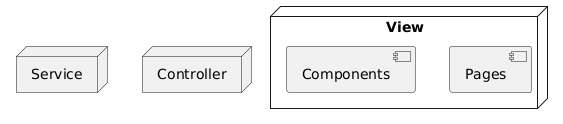
You might have noticed that we are missing the model layer in this diagram. This is because in front-end applications,
the model is often represented by the data that we fetch from an API or store in local storage.
In practice, this separation of concerns means that:
- Code of the
viewlayer is responsible for rendering the user interface and handling user interactions. It may therefore not access the local storage or call the fetch API directly. - The main responsiblity of the
servicelayer is to manage data. Therefore theservicelayer may access the web storage (local storage, session storage, ...) or call the fetch API to retrieve data from a server. It is responsible for transforming the data into a format that can be easily consumed by theviewlayer. Theservicelayer however may not access the DOM directly (think about statements like thedocument.querySelector). - The
controllerlayer is responsible for coordinating the interaction between theviewandservicelayers. By doing so, it acts as a mediator between theviewandservicelayers, which makes it perfectly suitable for managing the application's state and business logic. It handles data it receives from theviewlayer, processes it if necessary, and interacts with theservicelayer to fetch or update data. Thecontrollerlayer may not access the DOM directly (think about statements like thedocument.querySelectororaddEventListener) and may also not access the web storage or call the fetch API directly.
Next we could group our code into different folders that represent the different layers of our application. This allows us to keep our code organized and easy to navigate.
frontend-root/
├── view/
│   ├── components/
│   ├── pages/
├── controller/
└── service/
Modifiability
The folder structure give above is fine for small applications, but it due to the low cohesion at the feature level it is not very modifiable. When the application grows, it can become difficult to navigate and maintain. This is because all files related to a specific feature (components, controller, service) are spread across different folders, making it harder to see everything that belongs to that feature at a glance.
In larger applications, it is often better to use a feature-based folder structure, where all files related to a specific feature (components, controller, service) are grouped together. This can make it easier to develop, test, and maintain features independently, especially as the application grows.
frontend-root/
├── features/
│   ├── feature-1/
│   │   ├── components/
│   │   ├── controller/
│   │   └── service/
│   └── feature-2/
│       ├── components/
│       ├── controller/
│       └── service/
├── pages/
Here the features folder contains all the features of the application, and each feature has its own web-components,
controller, and service folders.
This allows us to keep all the code related to a specific feature together, making it easier to develop, test,
and maintain.
And since pages might contain the components from multiple features, the pages folder is a sibling to the
features folder.
[!NOTE]
Instead of using subfolders within the
featuresfolder, you can also use files with a naming convention that indicates the layer, such asfeature-1.service.js,feature-1.controller.js.
Reusability
Reusability is a key principle in front-end architecture that helps reduce duplication, speed up development, and ensure consistency across your application. By designing components, services, and utilities to be reusable, you can leverage the same code in multiple places, making your application easier to maintain and extend.
The feature-based folder structure given above has the disadvantage that you might end up with duplicate code across
different features. For example, if you have an API service that is used by multiple features, you might end up
duplicating the code in each feature's service folder.
Another example is are the common UI components (atoms and molecules) that are used across different features. To avoid
this, we can create a shared folder that contains all the reusable code, like shared components, services, and
utilities. This allows us to keep our code organized and easy to navigate, while still allowing us to reuse code across
different features.
frontend-root/
├── features/
│   ├── feature-1/
│   │   ├── components/
│   │   ├── controller/
│   │   └── service/
│   └── feature-2/
│       ├── components/
│       ├── controller/
│       └── service/
├── shared/
│   ├── components/
│   ├── service/
│   └── utils/
│   └── ...
├── pages/
By focusing on reusability, you create a more maintainable and robust front-end architecture that supports rapid development and consistent user experiences.
Performance
Performance is a crucial principle in front-end architecture, as it directly impacts user experience and satisfaction. A performant application loads quickly, responds to user interactions without noticeable delay, and efficiently manages resources.
To achieve good performance, consider the following strategies:
- Code Splitting: Break your application into smaller bundles so users only download the code they need for the current page or feature.
- Lazy Loading: Load components, images, or data only when they are needed, reducing initial load time.
- Efficient Rendering: Minimize unnecessary re-renders and DOM updates by using techniques like memoization, virtualization, and efficient state management.
- Asset Optimization: Compress images, minify CSS and JavaScript, and use modern formats to reduce file sizes.
- Caching: Use browser caching, service workers, and HTTP caching headers to avoid redundant network requests and speed up repeat visits.
- Minimize Third-Party Dependencies: Only include libraries and frameworks that are essential, as each dependency can increase bundle size and affect load times.
By prioritizing performance in your architecture, you ensure that your application remains fast and responsive as it grows, providing a better user experience for users. Regularly profiling and optimizing your application can help identify bottlenecks and areas for improvement.
However performance should not be the first priority when designing your architecture. It is more important to have a solid architecture that is easy to maintain and extend, and then optimize for performance later on. This is because performance optimizations can often lead to complex code that is difficult to understand and maintain. So it is better to focus on building a solid architecture first, and then optimize for performance later on.


